Showing posts with label java. Show all posts

Monday, February 9, 2015

Cassandra anti-pattern: Misuse of unlogged batches

This is my second post in a series about Cassandra anti-patterns, here's the first on distributed joins. This post will be on unlogged batches and the next one on logged batches.

Batches are often misunderstood in Cassandra.  They will rarely increase performance, that is not their purpose. That can come as quite the shock to someone coming from a relational database.

Let's understand why this is the case with some examples. In my last post on Cassandra anti-patterns I gave all the examples inside CQLSH, however let's write some Java code this time.

We're going to store and retrieve some customer events. Here is the schema: 


Here's a simple bit of Java to persist a simple value object representing a customer event, it also creates the schema and logs the query trace.


We're using a prepared statement to store one customer event at a time. Now let's offer a new interface to batch insert as we could be taking these of a message queue in bulk.


It might appear naive to just implement this with a loop:


However, apart from the fact we'd be doing this synchronously, this is actually a great idea! Once we made this async then this would spread our inserts across the whole cluster. If you have a large cluster, this will be what you want.

However, a lot of people are used to databases where explicit batching is a performance improvement. If you did this in Cassandra you're very likely to see the performance reduce. You'd end up with some code like this (the code to build a single bound statement has been extracted out to a helper method):


Looks good right? Surely this means we get to send all our inserts in one go and the database can handle them in one storage action? Well, put simply, no. Cassandra is a distributed database, no single node can handle this type of insert even if you had a single replica per partition.

What this is actually doing is putting a huge amount of pressure on a single coordinator. This is because the coordinator needs to forward each individual insert to the correct replicas. You're losing all the benefit of token aware load balancing policy as you're inserting different partitions in a single round trip to the database.

If you were inserting 8 records in a 8 node cluster, assuming even distribution, it would look a bit like this:
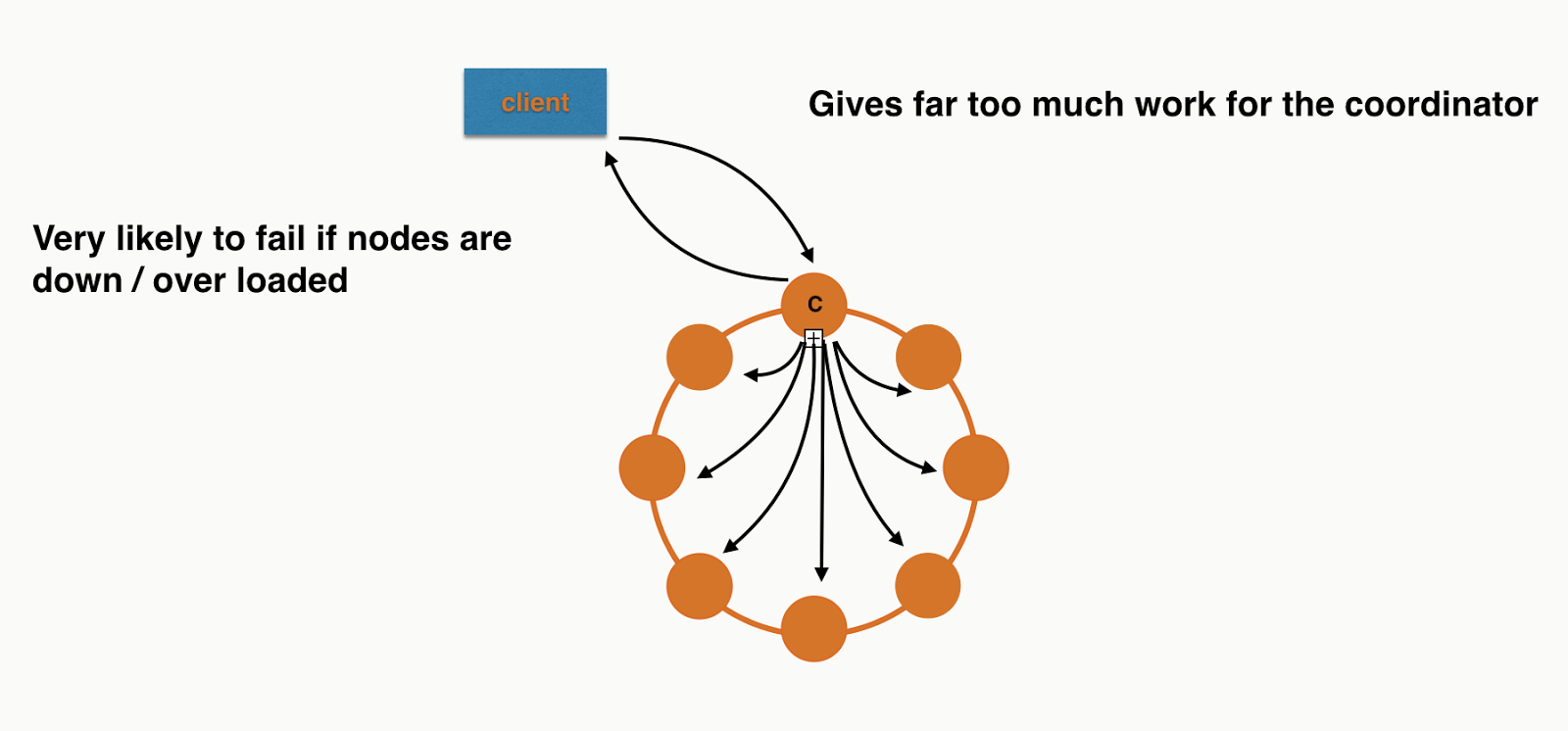

Each node will have roughly the same work to do at the storage layer but the Coordinator is overwhelmed. I didn't include all the responses or the replication in the picture as I was getting sick of drawing arrows! If you need more convincing you can also see this in the trace. The code is checked into Github so you can run it your self. It only requires a locally running Cassandra cluster.

Back to individual inserts


If we were to keep them as normal insert statements and execute them asynchronously we'd get something more like this:


Perfect! Each node has roughly the same work to do. Not so naive after all :)


So when should you use unlogged batches?


How about if we wanted to implement the following method:


Looks similar - what's the difference? Well customer id is the partition key, so this will be no more coordination work than a single insert and it can be done with a single operation at the storage layer. What does this look like with orange circles and black arrows?


Simple! Again I've left out replication to make it comparable to the previous diagrams.

Conclusion


Most of the time you don't want to use unlogged batches with Cassandra. The time you should consider it is when you have multiple inserts/updates for the same partition key. This allows the driver to send the request in a single message and the server to handle it with a single storage action. If batches contain updates/inserts for multiple partitions you eventually just overload coordinators and have a higher likelihood of failure.

The code examples are on github here.

Monday, December 8, 2014

Streaming large payloads over HTTP from Cassandra with a small Heap: Java Driver + RX-Java

Cassandra's normal use case is vast number of small read and write operations distributed equally across the cluster.

However every so often you need to extract a large quantity of data in a single query. For example, say you are storing customer events that you normally query in small slices, however once a day you want to extract all of them for a particular customer. For customers with a lot of events than this could be many hundreds of megabytes of data.

If you want to write a Java application that executes this query against a version of Cassandra prior to 2.0 then you may run into some issues. Let us look at the first one..

Coordinator out of memory:


Previous versions of Cassandra used to bring all of the rows back to the coordinator before sending them to your application, so if the result is too large for the coordinator's heap it would run out of memory.

Let's say you had just enough memory in the coordinator for the result, then you ran the risk of...

Application out of memory:


To get around this you had to implement your own paging, where you split the query into many small queries and processed them in batches. This can be achieved by limiting the results and issuing the next query after the last result of the previous query.

If your application was streaming the results over HTTP then the architecture could look something like this:


Here we place some kind of queue, say an ArrayBlockingQueue if using Java, between the thread executing the queries and the thread streaming it out over HTTP. If the queue fills up the DAO thread is blocked, meaning that it won't bring any more rows from Cassandra. If the DAO gets behind the WEB thread (perhaps a tomcat thread) blocks waiting to get more rows out of the queue. This works very nicely with the JAX-RS StreamingOutput.

This all sounds like a lot of hard work...

The 2.0+ solution


From version 2.0, Cassandra would no longer suffer from the coordinator out of memory. This is because the coordinator pages the response to the driver and doesn't bring the whole result into memory. However if your application reads the whole ResultSet into memory then your application running out of memory is still an issue.

However the DataStax driver's ResultSet pages as well, which works really nicely with Rx-Java and JAX-RS StreamingOutput. Time go get real, let's take the following schema:


And you want to get all the events for a particular customer_id (the partition key). First let's write the DAO:

Let's go through this line by line:

2: Async Execute of the query that will bring back more rows that will fit in memory.
4: Convert the ListenableFuture to an RxJava Observable. The Observable has a really nice callback interface / way to do transformation.
5: As ResultSet implements iterable we can flatMap it to Row!
6: Finally map the Row object to CustomerEvent object to prevent driver knowledge escaping the DAO.

And then let's see the JAX-RS resource class:

Looks complicated but it really isn't, first a little about JAX-RS streaming.

The way JAX-RS works is we are given a StreamingOutput interface which we implement to get a hold of the raw OutputStream. The container e.g Tomcat or Jetty, will call the write method. It is our responsibility to keep the container's thread in that method until we have finished streaming. With that knowledge let's go through the code:

5: Get the Observable<CustomerEvent> from the DAO.
6: Create a CountDownLatch which we'll use to block the container thread.
7: Register a callback to consume all the rows and write them to the output stream,
12: When the rows are finished, close the OutputStream.
16: Countdown the latch to release the container thread on line 33.
26: Each time we get a CustomerEvent, write it to the OutputStream.
33: Await on the latch to keep the container thread blocked.
39: Return the StreamingOutput instance to the container so it can call write.

Given that we're dealing with the rows from Cassandra asynchronously you didn't expect the code to be in order did you? ;)

The full working example is on my GitHub. To test it all I put around 600mb of data in a Cassandra cluster for the same partition. There is a sample class in the test directory to do this.

I then started the application with a MaxHeapSize of 256mb, then used curl to hit the events/stream endpoint:


As you can see 610M came back in 7 minutes. The whole time I had VisuamVM attached to the application and the coordinator and monitored the memory usage.

Here's the graph from the application:


The test was ran from 14:22 to 14:37. Even though we were pumping through 610M of data through the application the heap was gittering between 50m and 200m, easily able to reclaim the memory of the data we have streamed out.

For those new to Cassandra and other distributed databases this might not seem that spectacular, but I once wrote a rather large project to do what we can manage here in a few lines. Awesome work by the Apache Cassandra commitors and the DataStax Java driver team.

Friday, December 5, 2014

Cassandra summit EU - British Gas, i20 water, testing Cassandra and paging!

Yesterday was the EU Cassandra Summit in London, 1000 crazy Cassandra lovers. I've only just recovered from what was a hectic day.

Over the course of the day I got to do chat with two awesome companies, Michael Williams from i20 water and Josep Casals from British Gas Connected Homes. Both of these companies are using Cassandra to store time series data from devices, dare I use the ever popular buzz phrase Internet of Things?

But really they are, i20 water enable water companies to place sensors all around their network and gather the data to detect leaks, saving them 100s of millions of litres of water a day.

British Gas Connected homes are enabling their customers to turn their central heating on and off via their mobile, and are expanding into monitoring boilers and predicting when they'll fail/need a service.

In addition to speaking with Cassandra users I also snuck in a talk and a lightning talk. The talk was on how to test Cassandra applications and the lightning talk on server side paging.

Here are the slides for the talk, the video will no doubt be online soon:


And for the lightning talk:


Monday, December 1, 2014

Talking about Cassandra at the LJC open conference 2014

The LJC conference is a yearly event for Java/JVM developers in London to get together and see some (hopefully) great talks :)

IBM kindly provide the an awesome venue on South Bank at no charge.

I had the fortune of being scheduled to talk first which means I could get my talk done and then enjoy the rest of the day. I chose to speak about Cassandra for Java devs which went down really well and I had people coming to me all day asking about Cassandra.

Here are the slides:


Overall it was an awesome day and I look forward to next year :)


Sunday, June 15, 2014

The modern developer: Understanding TCP

A couple of years ago I am not sure when interviewing candidates that I would have delved into their knowledge of the TCP protocol.

However I think I've changed my mind, why?

Reason one: The Cloud. The marketer tells us that the cloud means that we don't need to care where our servers are or where our applications are deployed. But for the developer I think the opposite is true. Suddenly rather than internal high speed network links our applications are being deployed onto commodity hardware with shoddy network links that regularly go down.

Reason two: Micro-service architecture. As we split up our applications into small components we're also adding to the number of integration points, most of those integration points will be over TCP.
So what should a well rounded developer know about their system and its dependencies:
  1. For any calls outside of their application's process:
    1. What is the underlying protocol?
    2. What is the connection timeout for that protocol?
    3. What is the read timeout for that protocol?
    4. What is the write timeout for that protocol?
  2. Are there any firewalls between your application and its dependencies?
  3. Does the traffic sent between your applications, or your application and its dependencies go over the Internet?
  4. What happens if a dependency responds slower than usual at the application level?
  5. What happens if a dependency responds slower, or not at all, at the protocol level?
And I think the best way to know the answer to these question is to test these scenarios. And to do that they need a good understanding of how TCP works and when it can go wrong. They need to be able to use tools like tcpdump, wireshark and netcat. How many "Java developers" do you think fall into this category and would test these scenarios? 

How many would say: Well I call a Java method that does the connection, what do I care?

As soon as you remember that the people writing these libraries are just as human as you, you might have second thoughts about not testing the "too edge-case". Most people are surprised to realise that a lot of libraries just use the operating system's timeout value for TCP connections, which is usually measured in minutes, not seconds. How do you explain to your users why your application hung for 10 minutes?

I no longer see any of the above scenarios as edge cases, it just might take a few weeks in production for each of them to happen.

Saturday, May 24, 2014

Using Stubbed Cassandra: Unit testing Java applications

My first article on Scassandra introduced what it is and why I've made it.

This article describes how to use Scassanda to help unit test a Java class that stores and retrieves data from Cassandra.

It assumes you're using a tool that can download dependencies from maven central e.g Maven, Gradle or SBT.

First add Scassandra as a dependency. It is in maven central so you can add it to your pom with the following xml:

<dependency>
  <groupId>org.scassandra</groupId>
  <artifactId>java-client</artifactId>
  <version>0.2.1</version>
</dependency>

Or the following entry in your build.gradle:

dependencies {
    compile('org.scassandra:java-client:0.2.1')
}

There are four important classes you'll deal with from Java:
  • ScassandraFactory - used to create instances of Scassandra
  • Scassandra - interface for starting/stopping Scassandra and getting hold of a PrimingClient and an ActivityClient
  • PrimingClient - sends priming requests to Scassandra RESTful admin interface
  • ActivityClient - retrieves all the recorded queries and prepared statements from the Scassandra RESTful admin interface

The PrimingClient and ActivityClient have been created to ease integration for Java developers. Otherwise you would need to construct JSON and send it over HTTP to Scassandra.

You can start a Scassandra instance per unit test and clear all primes and recorded activity between tests.

To start Scassandra before your test starts add a BeforeClass e.g:


You can also add a AfterClass to close Scassandra down:

Now that you have Scassandra running lets write a test. Perhaps you want to test a simple Java DAO that connects to Cassandra and executes a query.

And you have a backing table like:

CREATE TABLE person (
  id int,
  first_name text,
  PRIMARY KEY (id)
)

Lets TDD the DAO using Scassandra starting with our connect method:

Lets look at what this code is doing:
  • Line 4: Informs the activity client to clear all recorded connections. This is to stop other tests that have caused connections interfering with this one. 
  • Line 6: We call on connect on our PersonDao.
  • Line 8: We call retrieveConnections on the activity client and expect there to be at least one. The Java Datastax driver makes multiple connections on startup so you can't assert for this to be 1.
This fails with the following message:

java.lang.AssertionError: Expected at least one connection to Cassandra on connect
at org.junit.Assert.fail(Assert.java:88)
at org.junit.Assert.assertTrue(Assert.java:41)
at com.batey.examples.scassandra.PersonDaoTest.shouldConnectToCassandraWhenConnectCalled(PersonDaoTest.java:94)

Now lets write some code to make it pass:

Now lets test the retrieveNames function gets all the first_names out of the person table.

This will prime Scassandra to return a single row with the column first_name with the value Chris. We expect our DAO to turn that into a List of strings containing Chris. To make this pass we need to execute a query and convert the ResultSet, something like this:

Next lets say you have the requirement that you really must not get an out of date list of names. So you want to test that the consistency you do the query is QUORUM. You can test this like this:

Lets look at what each line is doing:
  • Line 4 builds the expected query, note the consistency is also set. If you build a Query without a consistency it defaults to ONE.
  • Line 7 clears all the recorded activity so that another test does not interfere with this one. It also clears the queries that were executed as part of connect (the Datastax Java driver issues quite a few queries on the system keyspace on startup)
  • Line 11 retrieves all the queries your application has execited
  • Line 12 verifies the expected query that was built on Line 4 has been executed

This will fail with an error message like this:

java.lang.AssertionError: Expected query with consistency QUORUM, found following queries: [ {Query{query='select * from people', consistency='ONE'}]

We can make this pass by adding the consistency to our query:

And we're done!

This has been a brief instruction to Scassandra but hopefully the above gives you an idea of how Scassandra can be used to test your Java applications that use Cassandra. We've covered:
  • Priming basic queries
  • Verifying queries
  • Verifying connections
Future blog posts will show you how to:
  • Prime prepared statements
  • Prime different column types in responses
  • Prime error cases
Scassandra has only just been released. The future road map includes:
  • JUnit rule so you don't need to handle starting/stopping and clearing recorded activity
  • More generic priming e.g any query on this table
  • Support for more drivers
All the code for this example can be found in full here.

Thursday, February 13, 2014

Testing your RESTful services with Groovy, Spock and HTTPBuilder

I like to test the HTTP portion of the RESTful web services I build in isolation. This is because, in the languages I use (Java, Scala), most of the code responsible for taking in HTTP requests and parsing them is very framework specific and simply delegates the actual logic to another part of my application. Ideally I can launch this part of my application in the same way as it is launched in production but with the rest of the application stubbed out.

Recently I've been using Groovy/Spock for these integration tests, here's how for a really simple web service. In this example it's been built with Spring Boot.

Let's not go into the details of how Spring boot work but it is essentially the same application as in Spring's guide.

The web application has a single path: /exampleendpoint which takes in a single query param: input and returns a JSON object with a single field payload with the value: Something really important: with the input appended.

I want to test that the web service takes in HTTP, takes the query parameter out and builds the JSON correctly. With Groovy/Spock/HTTPBuilder here's how it looks:

Let's look at what is going on here:
  • In the setup phase we create a RESTClient
  • In the exercising phase we make a call out to the web application.
  • In the verification phase we check that the response code is 200, the content type is "application/json" and the body is JSON with a single payload field that contains "Something really important: Get a hair cut"
Benefits over writing this in Groovy/Spock over say just using Java/JUnit:
  • The HTTP libraries are easier to use with less code
  • The assertions are more expressive
  • More magic, for instance the second with() block works on a Groovy map that has automagically created
The above example doesn't deal with how to start and stop the web service under test, I left that out as it is very web framework specific. 

What do you need in your build to get this setup? I used Gradle for this example so it is probably easier to just check out the build.gradle, a lot of it can be ignored as it is related to Spring Boot rather than Spock. Here are the important bits:

The plugins:

And the dependencies:

The entire project is here. Happy testing.

Tuesday, October 1, 2013

Cassandra: Datastax Java driver retry policy

The Datastax Java Driver for Cassandra exposes its strategy for retrying via the following interface:

There are three scenarios you can control retry policy for:
  1. Read time out: When a coordinator received the request and sent the read to replica(s) but the replica(s) did not respond in time
  2. Write timeout: As above but for writes
  3. Unavailable: When the coordinator is aware there aren't enough replica available without sending the read/write request on

What is the default behaviour?


The DefaultRetryPolicy retries with the following behaviour:
  1. Read timeout: When enough replica are available but the data did not come back within the configured read time out 
  2. Write timeout: Only if the initial phase of a batch write times out - see cassandra batch statement
  3. Unavailable timeout: Never

How do I configure the value for the read and write timeout?


This is configured in the cassandra.yaml on the Cassandra server.  The default is 10 seconds, you can change the following properties:
# How long the coordinator should wait for read operations to complete
read_request_timeout_in_ms: 10000
# How long the coordinator should wait for writes to complete
write_request_timeout_in_ms: 10000

What are the other policies?


DowngradingConsistencyRetryPolicy

The most complicated retry policy and comes with a big warning: your read/write may be re-tried at a lower consistency. So if you have business requirements to not report success if you don't meet a certain level of consistency then use this with cation.

What does it do?
  1. Read: If at least one replica responded then the read is retried at a lower consistency
  2. Write: Retries for unlogged batch queries when at least one replica responded (see http://www.datastax.com/dev/blog/atomic-batches-in-cassandra-1-2) and for all other types of writes the timeout is just ignored if at least one replica acknowledged the write (essentially ignoring the consistency request)
  3. Unavailable: If at least one replica is available then the query is re-tried with a lower consistency

FallthroughRetryPolicy

No retrying! Any failure is re-thrown to the client.

LoggingRetryPolicy


This is just a decorator policy that you can wrap around any other policy that logs ignored (no retry) and any actual retries. The driver uses SLF4J and logs at INFO level.

How do I use a different policy?


Simply add it with creating your Cluster. The retry policies all have a singleton you can use e.g:


Conclusion


The Datastax driver is very open for extension as it exposes its strategies for retry, load balancing and reconnection. 

The retry policy is very easy to work with as all the current implementations are stateless. I'll follow this post up with how to implement your own retry policy.

Wednesday, September 25, 2013

Talk: Introduction to Cassandra, CQL, and the Datstax Java Driver

Presenter: Johnny Miller
Who is he? Datastax Solutions Architect
Where? Skills matter exchange in London

I went to an "introductory" talk even though I have a lot of experience with Cassandra for a few reasons:
  • Meet other people in London that are using Cassandra
  • To discover what I don't know about Cassandra
Here are my notes that in roughly the same order as the talk.

What's Cassandra? The headlines

  • Been around for ~5 years - originally developed by Facebook for their inbox search
  • Distributed key store - column orientated data model
  • Tuneable consistency - per request decide how consistent you want the response to be
  • Datacenter aware with asynchronous replication
  • Designed for use as a cluster - not much value in a single node Cassandra deployment

Gossip - how nodes in a cluster learn about other nodes

  • P2P protocol for how nodes discover location and state of other nodes
  • New nodes are given seed nodes for bootstrapping - but these aren't single points of failure as they aren't used again

Data distribution and replication

  • Replication factor: How many nodes each piece of data is stored on
  • Each node is given a range of primary keys to look after

Partitioners - How to decide which node gets what data

  • Row keys are hashed to decide node then a replication strategy defines how to pick the other replicas

Replicas - how to select where else the data lives

  • All replicas are equally important. No difference between the node the key hashed to and the other replicas that were selected
  • Two ways to pick the other replicas:
    • Simple: Only single DC. Specify just a replication factor. Hashes the key and then walks the cluster and picks the replicas. Not very clever - all replicas could end up on the same rack
    • Network: Configure with a RF per DC. Walk the ring for each DC until it reaches a node in another rack

Snitch - how to define a data centre and a rack

  • Informs Cassandra about node topology, designates DC and Rack for every node
  • Example: Rack inferring snitch designates DC and Rack based on the IP of the node 
  • Example: Property file snitch where every node has the DC and Rack of every other node
  • Example: GossipingPropertyFileSnitch: Every node knows its own DC and Rack and tells other nodes via Gossip
  • Dynamic snitching: monitors performance of reads, this snitch wraps the other snitches to respond to network latency

Client requests

  • Connect to any client in the node - becomes the coordinator. This node knows which nodes to talk to for the request
  • Multi DC - picks a coordinator in the other data centre  to replicate data there or to get data for a read

Consistency

  • Quorum = (Replication Factor/2) + 1 i.e. more than half
  • E.g R = 3, Q = 2, tolerate 1 replica going down to continue reading and writing at Quorum
  • Per request consistency - can decide certain writes are more important and require higher consistency than others
  • Example consistency levels: ANY, ONE, TWO, THREE, QUORUM, EACH_QUORUM, LOCAL_QUORUM
  • SERIAL: New in cassandra 2.0

Write requests - what happens?

  • The coordinator (node the client connects to) forwards the write to all the replicas in the local DC and designates a coordinator in the other DCs to do the same there
  • The coordinator may be a replica but does not need to be
  • For a single node writes first go to commit log (disk), then writes to meltable (memory)
  • When does the write succeed? Depends on consistency e.g a write consistency of ONE means that the data needs to be in the commit log and memtable of at least one replica

Hinted handoff - how Cassandra deals with nodes being down on write

  • Coordinator node keeps hints if one of the replicas down
  • When the node comes back up the hints are then sent to the node so it can catch up
  • Hints are kept for a finite amount of time - default is three hours

Read requests  - what happens?

  • Coordinator contacts a number of nodes depending on the consistency - once enough have responded the read can be successful 
  • Will send requests to node responding the fastest
  • If not consistent - compare timestamps + do a read repair
  • Possible other background read repair

What was missing?

Overall it was a great talk however here is some possible improvements:
  • A glossary/overview at the start? Perhaps a mapping from relational terminology to Cassandra terminology. For example the term keyspace was used a number of times before describing what it is
  • Overview of consistency when talking about eventual consistency - however this did come later? A few scenarios for when read/writes at different consistency levels would fail/succeed would have been very helpful 
  • Compaction required for an intro talk? I thought talking about compaction was a bit too much for an introductory talk as you need to understand memtables and sstables before it makes sense
  • The downsides of Cassandra: for example some forms of schema migration/change is a nightmare when you are using CQL3 + have data you need to migrate

Saturday, September 14, 2013

Scala: What logging library to use?

Having investigated a few options I have decided on SLF4J + Logback + Grizzled. The project I am currently on uses Scalatra - this matches their solution.

Three libraries?? That sounds overkill but it is in fact very simple.

SLF4J + Logback are common place in Java projects. SLF4J is logging facade - basically a set of interfaces to program to where as Logback is an implementation you put on your classpath at runtime. There are other implementations of SLF4J you can use such as Log4J. Grizzled is a Scala wrapper around SLF4J to give it Scala like usage.

Having worked on many Java projects that use SLF4J + Logback I'm used to seeing lines at the top of files that look like this:
private static final Logger LOGGER = LoggerFactory.getLogger(SomeClass.class)
Fortunately Grizzled-SLF4J + traits help here.

Mixing in the Grizzled Logging trait allows you to write logging code like this:

This will produce logs like this:
09:57:11.169 [main] INFO com.batey.examples.SomeClass - Some information
09:57:11.172 [main] ERROR com.batey.examples.SomeClass - Something terrible
The grizzled trait uses your class name as the logger name. Job done with less boilerplate than Java!

Everything you need s on Maven central so can be added to your pom or sbt dependencies:
Grizzled: Grizzled
Logback: Logback

Friday, August 16, 2013

Gradle, Groovy and Java

I've been moving my projects from Maven to Gradle and it has given me my first exposure to Groovy as it's Gradle's language of choice. Gradle is the perfect build tool for Java projects, Groovy projects and polyglot projects containing any combination of JVM languages. To get going with Groovy with Gradle you need to add the Groovy plugin to a Gradle script - this extends the Java plugin:

apply plugin: 'groovy'

Then the Gradle build will look for both Groovy and Java when you build your project:

Christophers-MacBook-Pro:testing chbatey$ gradle build
:compileJava UP-TO-DATE
:compileGroovy UP-TO-DATE
:processResources UP-TO-DATE
:classes UP-TO-DATE
:jar UP-TO-DATE
:assemble UP-TO-DATE
:compileTestJava UP-TO-DATE
:compileTestGroovy UP-TO-DATE
:processTestResources UP-TO-DATE
:testClasses UP-TO-DATE
:test UP-TO-DATE
:check UP-TO-DATE
:build UP-TO-DATE

BUILD SUCCESSFUL

IntelliJ's support for Gradle has improved vastly as of late but if you experience problems revert to the Gradle idea plugin instead - I tend to use it if the Gralde project is more than a simple Groovy/Java project. Importing a project with just the above in your Gradle script and having created source folders for Java and Groovy IntelliJ should recognise everything:


Now lets create some Groovy and Java! To allow us to interchange between Java and Groovy and be able to add some unit tests, add the following to the build.gradle:

repositories {
    mavenCentral()
}

dependencies {
    compile 'org.codehaus.groovy:groovy:2.1.6'
    testCompile 'junit:junit:4.+'
}

Now lets see a Groovy class testing a Java class:


On the left we can see a Java class in the main source tree and on the left a Groovy class testing it. This is a nice way to learn some Groovy and write tests with less boilerplate. You can say goodbye to types and semicolons. It is an easy transition for a Java developer as all Java is valid Groovy so you can write Java and Groovyify it as much or as little as you like. There is nothing stopping you from adding production Groovy code and testing it with Java as well.

If you want to stay on the command line then just run gradle test from the command line. If you want the source it's on GitHub: https://github.com/chbatey/GroovyTestingJava

Wednesday, February 20, 2013

From Spring to Guice

For the past two and a half years I have worked primarily on standalone Java applications using Spring/Relational databases and messaging software such as Websphere MQ.

The Well Grounded Java Developer by Ben Evans and Martijn Verburg mentions Guice as an alternative to Spring for dependency injection. I like learning new technologies so I've decided to give it ago!

Here's my attempt at getting a little Guice application up and running. Firstly, I'm going to use Gradle and I'm going to get the Guice jars from the maven central repo. Here is my gradle build file:


apply plugin: 'java'
apply plugin: 'idea'

repositories {
  mavenCentral()
}

dependencies {
  compile 'com.google.inject:guice:3.0'
  testCompile 'junit:junit:4.11'
  testCompile 'org.mockito:mockito-all:1.9+'
}

I've also applied the idea plugin as I am trying out IntelliJ this week after seven years of Eclipse!

So I want a simple application that stores expenses. I am currently spending far too much money on coffee and want to start tracking it.

Lets start with a simple interface:

package com.batey.expense.store;

public interface ExpenseStorer {
    void storeExpense(Expense e);
    Expenses lookupExpenses(String name);
}

With a simple implementation:

package com.batey.expense.store;

import com.google.inject.Singleton;
import org.slf4j.Logger;
import org.slf4j.LoggerFactory;

import java.util.HashMap;
import java.util.Map;

@Singleton
public class InMemoryExpenseStorer implements ExpenseStorer {
    private static final Logger LOGGER = LoggerFactory.getLogger(InMemoryExpenseStorer.class);
    private static final Expenses NULL_EXPENSE = new Expenses();
    private Map<String, Expenses> expenses = new HashMap<>();
    @Override
    public void storeExpense(Expense e) {
        Expenses expenses1 = expenses.get(e.getName());
        if (expenses1 == null) {
            expenses1 = new Expenses();
            expenses.put(e.getName(), expenses1);
            expenses1.setGroupName(e.getName());
        }
        expenses1.getExpenses().add(e);
        LOGGER.info("Got {}", expenses1);
        LOGGER.info("Updated expenses {}", expenses);
    }

    @Override
    public Expenses lookupExpenses(String name) {
        Expenses expenses1 = expenses.get(name);
        LOGGER.info("Current expenses {}", expenses);
        if (expenses1 == null) {
            expenses1 = new Expenses();
            expenses1.setGroupName(name);
            expenses.put(name, expenses1);
        }
        LOGGER.info("Returning {}", expenses1);
        return expenses1;
    }
}

Now I want to use this class in another part of my system. Lets say we have another class called BudgetTracker:

package com.batey.expense.budget;

import com.batey.expense.store.ExpenseStorer;
import com.batey.expense.store.Expense;
import com.batey.expense.store.Expenses;
import com.google.inject.Inject;

import java.math.BigDecimal;

public class BudgetTracker {

    @Inject
    private ExpenseStorer expenseStorer;

    public void buySomething(String description, String who, BigDecimal howMuch) {
        Expense expense = new Expense();
        expense.setAmount(howMuch);
        expense.setName(who);
        expense.setDescription(description);
        expenseStorer.storeExpense(expense);
    }

    public BigDecimal howMuchHaveISpent(String who) {
        Expenses expenses = expenseStorer.lookupExpenses(who);
        return expenses.getTotal();
    }
}

Everything above was done without thinking about dependency injection. Then rather than instantiate an ExpenseStorer directly I then read through Google's getting started guide at http://code.google.com/p/google-guice/wiki/GettingStarted and added the Guide annotations in red.

So how do we run this? For that we need a Guide module:

package com.batey.expense.store;

import com.google.inject.AbstractModule;

public class ExpenseModule extends AbstractModule {
    @Override
    protected void configure() {
        bind(ExpenseStorer.class).to(InMemoryExpenseStorer.class);
    }
}

And then I put together a very simple main method:

package com.batey.expense.budget;

import com.batey.expense.store.ExpenseModule;
import com.google.inject.Guice;
import com.google.inject.Injector;

import java.math.BigDecimal;

public class Main {
    public static final void main(String[] args) {
        Injector injector = Guice.createInjector(new ExpenseModule());
        BudgetTracker budgetTracker = injector.getInstance(BudgetTracker.class);

        budgetTracker.buySomething("A tv", "Chris", new BigDecimal("100.00"));
        budgetTracker.buySomething("A cake", "Chris", new BigDecimal("50.00"));

        System.out.println("Chris has spent: " + budgetTracker.howMuchHaveISpent("Chris"));
    }
}

And then running this:

20:39:46.168 [main] INFO  c.b.e.store.InMemoryExpenseStorer - Got Expenses{expenses=[Expense{name='Chris', amount=100.00, description='A tv'}], total=0, groupName='Chris'}
20:39:46.171 [main] INFO  c.b.e.store.InMemoryExpenseStorer - Updated expenses {Chris=Expenses{expenses=[Expense{name='Chris', amount=100.00, description='A tv'}], total=0, groupName='Chris'}}
20:39:46.172 [main] INFO  c.b.e.store.InMemoryExpenseStorer - Got Expenses{expenses=[Expense{name='Chris', amount=100.00, description='A tv'}, Expense{name='Chris', amount=50.00, description='A cake'}], total=0, groupName='Chris'}
20:39:46.172 [main] INFO  c.b.e.store.InMemoryExpenseStorer - Updated expenses {Chris=Expenses{expenses=[Expense{name='Chris', amount=100.00, description='A tv'}, Expense{name='Chris', amount=50.00, description='A cake'}], total=0, groupName='Chris'}}
20:39:46.172 [main] INFO  c.b.e.store.InMemoryExpenseStorer - Current expenses {Chris=Expenses{expenses=[Expense{name='Chris', amount=100.00, description='A tv'}, Expense{name='Chris', amount=50.00, description='A cake'}], total=0, groupName='Chris'}}
20:39:46.172 [main] INFO  c.b.e.store.InMemoryExpenseStorer - Returning Expenses{expenses=[Expense{name='Chris', amount=100.00, description='A tv'}, Expense{name='Chris', amount=50.00, description='A cake'}], total=0, groupName='Chris'}
Chris has spent: 150.00


Key points:
  • We use the @Singleton on the ExpenseStorer to say we only want one of these in our application. Singleton is the default in spring: not so in Guice.
  • We use @Inject to identify a field needs injected. This could have also been done via the constructor. This is like the spring @Autowired
  • Inside the ExpenseModule we bind any injected ExpenseStorers to the InMemoryExpenseStorer implementation.
Success! From never having used Guice getting this together was very straightforward and took under thirty minutes. My initial thoughts of Guice for dependency injection:
  • It is very simple! I don't remember how long my first Spring application took me to get going but I bet it was longer than this!
  • No XML! Some people love configuration XML; others hate it. Personally, I'm sitting on the fence. In the latest applications I've written I've used a combination of annotations Java config along with XML config. Guice is pure Java config and I'd have to see a large scale project using it before passing judgement on that.
  • Standardisation! Guice is the first implementation of JSR330 - making DI standardized in Java can only be a good thing.
I'm going to keep building my expense application with Guice and will post more about it when I have used it more!