Wednesday, February 18, 2015

A simple MySql to Cassandra migration with Spark

I previously blogged about a Cassandra anti-pattern: Distributed joins. This commonly happens when people move from a relational database to a Cassandra. I'm going to use the same example to show how to use Spark to migrate data that previously required joins into a denormalised model in Cassandra.

So let's start with a simple set of tables in MySQL that store customer event information that references staff members and a store from a different table.


Insert a few rows (or a few million)


Okay so we only have a few rows but imagine we had many millions of customer events and in the order of hundreds of staff members and stores.

Now let's see how we can migrate it to Cassandra with a few lines of Spark code :)

Spark has built in support for databases that have a JDBC driver via the JdbcRDD. Cassandra has great support for Spark via DataStax's open source connector. We'll be using the two together to migrate data from MySQL to Cassandra. Prepare to be shocked how easy this is...

Assuming you have Spark and the connector on your classpath you'll need these imports:


Then we can create our SparkContext and it also adds the Cassandra methods to the context and to RDDs.

My MySQL server is running on IP 192.168.10.11 and I am connecting very securely with with user root and password password.

Next we'll create the new Cassandra table, if yours already exists skip this part.


Then it is time for the migration!


We first create an JdbcRDD allowing MySQL to do the join. You need to give Spark a way to partition the MySql table, so you give it a statement with variables in and a starting index and a final index. You also tell Spark how many partitions to split it into, you want this to be greater than the number of cores in your Spark cluster so these can happen concurrently.

Finally we save it to Cassandra. The chances are this migration will be bottle necked by the queries to MySQL. If the Store and Staff table are relatively small it would be worth bringing them completely in to memory, either as an RDD or as an actual map so that MySQL doesn't have to join for every partition.

Assuming your Spark workers are running on the same servers as your Cassandra nodes the partitions will be spread out and inserted locally to every node in your cluster.

This will obviously hammer the MySQL server so beware :)

The full source file is on Github.

Monday, February 9, 2015

Cassandra anti-pattern: Misuse of unlogged batches

This is my second post in a series about Cassandra anti-patterns, here's the first on distributed joins. This post will be on unlogged batches and the next one on logged batches.

Batches are often misunderstood in Cassandra.  They will rarely increase performance, that is not their purpose. That can come as quite the shock to someone coming from a relational database.

Let's understand why this is the case with some examples. In my last post on Cassandra anti-patterns I gave all the examples inside CQLSH, however let's write some Java code this time.

We're going to store and retrieve some customer events. Here is the schema: 


Here's a simple bit of Java to persist a simple value object representing a customer event, it also creates the schema and logs the query trace.


We're using a prepared statement to store one customer event at a time. Now let's offer a new interface to batch insert as we could be taking these of a message queue in bulk.


It might appear naive to just implement this with a loop:


However, apart from the fact we'd be doing this synchronously, this is actually a great idea! Once we made this async then this would spread our inserts across the whole cluster. If you have a large cluster, this will be what you want.

However, a lot of people are used to databases where explicit batching is a performance improvement. If you did this in Cassandra you're very likely to see the performance reduce. You'd end up with some code like this (the code to build a single bound statement has been extracted out to a helper method):


Looks good right? Surely this means we get to send all our inserts in one go and the database can handle them in one storage action? Well, put simply, no. Cassandra is a distributed database, no single node can handle this type of insert even if you had a single replica per partition.

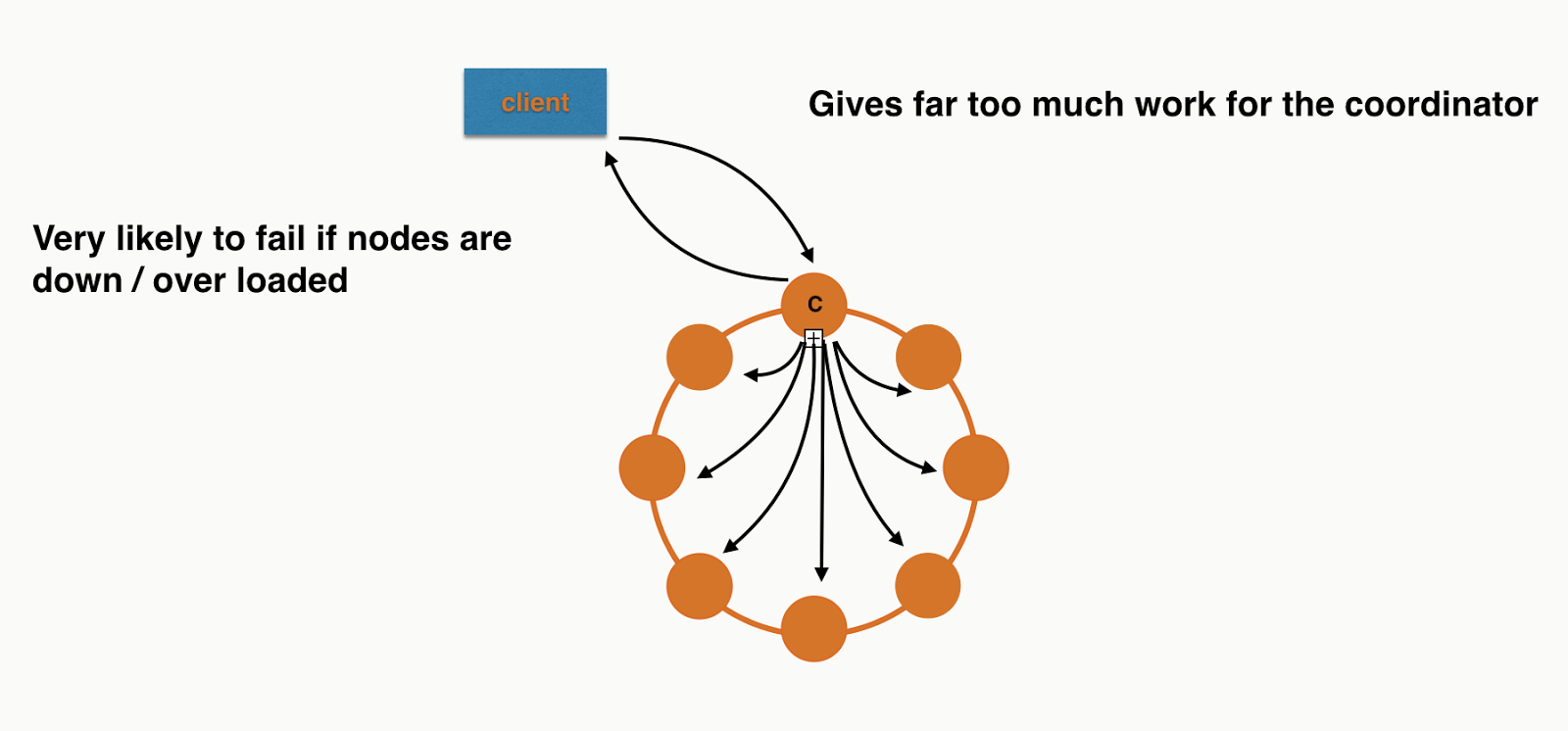
What this is actually doing is putting a huge amount of pressure on a single coordinator. This is because the coordinator needs to forward each individual insert to the correct replicas. You're losing all the benefit of token aware load balancing policy as you're inserting different partitions in a single round trip to the database.

If you were inserting 8 records in a 8 node cluster, assuming even distribution, it would look a bit like this:


Each node will have roughly the same work to do at the storage layer but the Coordinator is overwhelmed. I didn't include all the responses or the replication in the picture as I was getting sick of drawing arrows! If you need more convincing you can also see this in the trace. The code is checked into Github so you can run it your self. It only requires a locally running Cassandra cluster.

Back to individual inserts


If we were to keep them as normal insert statements and execute them asynchronously we'd get something more like this:


Perfect! Each node has roughly the same work to do. Not so naive after all :)


So when should you use unlogged batches?


How about if we wanted to implement the following method:


Looks similar - what's the difference? Well customer id is the partition key, so this will be no more coordination work than a single insert and it can be done with a single operation at the storage layer. What does this look like with orange circles and black arrows?


Simple! Again I've left out replication to make it comparable to the previous diagrams.

Conclusion


Most of the time you don't want to use unlogged batches with Cassandra. The time you should consider it is when you have multiple inserts/updates for the same partition key. This allows the driver to send the request in a single message and the server to handle it with a single storage action. If batches contain updates/inserts for multiple partitions you eventually just overload coordinators and have a higher likelihood of failure.

The code examples are on github here.

Tuesday, February 3, 2015

Testing Cassandra applications: Stubbed Cassandra 0.6.0 released

Stubbed Cassandra (Scassandra) is an open source test double for Cassandra. Martin Fowler has a very general definition of what a test double actually is.

When I refer to a test double I mean stubbing out at the protocol level. So if your application makes calls over HTTP, your test double acts as an HTTP server where you can control the responses, and most importantly: inject faults. Wiremock is a great example of a test double for HTTP.

I like this kind of stubbing out as it allows me to really test drivers / network issues etc. Deploying to cloud environments where network/servers going down happens more frequently makes this even more important. If you're using a JVM language and all this happens in the same JVM it is also quick.

Why is this release important?


This is an important release for Scassandra as it now supports all types, previously it only supported the subset of CQL that my old employer, BSkyB, used. Now's a good time to mention that this tool was developed completely in my own time and not while working there :)

It still has lots of limitations (no user defined types, no batch statements, no LWT) but as it is designed to test individual classes it is still usable for all your code that doesn't use these features even if they are used some where in your application.

I had previously used it for full integration tests, in that case it had to support your entire schema. I have stopped doing that as I intend to build a different type of Cassandra testing tool for that using CASSANDRA-6659. This JIRA extracted an interface for handling queries, which I want to use to inject faults/delays etc. If you haven't used Scassandra before it is important to know it doesn't embed a real Cassandra, it just implements there server side of the native protocol and "pretends" to be Cassandra.

Version 0.6.0 has a view of Cassandra 3.0, where embedded collections are likely to be supported. Previously you used an enum to inform Scassnadra what your column types are, or the variables in prepared statements.  For example:


Here the withColumnTypes method on the builder informs Scassandra how to serialise the rows passed into withRows.

This worked for primitive types e.g Varchar, Text. But what about collections? Sets were supported first so I went with VarcharSet etc, bad idea! What about Maps? That is a lot of combinations, and even worse List<Map<String, Int>>?

An enum was a bad idea, so in 0.6.0 I've introduced the CqlType, this has sub classes for Primitive/Collections and there is a set of static methods and constants to make it nearly as convenient as an enum for the simple types. The advantage of this is I can now embed types inside each other e.g


And then when Cassandra 3.0 comes we can have things like map(TEXT, map(TEXT, TEXT)) for a multi map.

The end goal is actually for you to give your schema to Scassandra and it will just work this out. This is some way off as it requires being able to parse CQL and at the moment Scassandra just pattern matches against your queries.

Happy testing and as always any feature requests/feedback just ping me on twitter @chbatey

Unit testing Kafka applications

I recently started working with Kafka. The first thing I do when start with a tech is work out how I am going to write tests as I am a TDD/XP nut.

For HTTP I use Wiremock, for Cassandra I wrote a test double called Stubbed Cassandra. The term test double comes from the awesome book Release It! where it recommends for each technology you integrate with having a test double that you can prime to fail in every way possible.

I couldn't find anything for Kafka but I did find a couple of blogs and gists for people running Kafka/Zookeeper in the same JVM as tests.

That's a start, I took it one step further and wrote a version that will hide away all the details, including a JUnit rule so you don't even need to start/stop it for tests as well as convenient methods to send and receive messages. Here's an example of an integration test for the KafkaUnit class:


Let's say you have some code that sends a message to Kafka, like this:

A unit test would look something like this:

It is in Maven Central, so if you want to use it just add the following dependency:

<dependency>
  <groupId>info.batey.kafka</groupId>
  <artifactId>kafka-unit</artifactId>
  <version>0.1.1</version>
</dependency>

If you want to contribute check it out on github.

It is pretty limited so far, assumed String messages etc. If I keep working with Kafka I'll extend it and add support for injecting faults etc. Also for the next version I'll come up with a versioning mechanism that includes the Kafka version.

Monday, February 2, 2015

Cassandra anti-pattern: Distributed joins / multi-partition queries

There’s a reason when you shard a relational databases you are then prevented from doing joins. Not only will they be slow and fraught with consistency issues but they are also terrible for availability. For that reason Cassandra doesn’t even let you join as every join would be a distributed join in Cassandra (you have more that one node right?).

This often leads developers to do the join client side in code. Most of the time this is a bad idea, but let’s understand just how bad it can be.

Let’s take an example where we want to store what our customers are up to, here’s what we want to store:
  • Customer event
    •  customer_id  e.g ChrisBatey
    •  staff_id e.g Charlie
    •  event_type e.g login, logout, add_to_basket, remove_from_basket
    •  time
  • Store
    • name
    • store_type e.g Website, PhoneApp, Phone, Retail
    • location
We want to be able to do retrieve the last N events, time slices and later we’ll do analytics on the whole table. Let’s get modelling! We start off with this:


This leads us to query the customer events table, then if we want to retrieve the store or staff information we need to do another query. This can be visualised as following (query issued at QUORUM with a RF of 3):


For the second query we’ve used a different coordinator and have gone to different nodes to retrieve the data as it is in a different partition.

This is what you’d call a one to one relationship for a single query but in reality it is a many to one as no doubt many customer events reference the same store. By doing a client side join we are relying on a lot of nodes being up for both our queries to succeed.

We’d be doing a similar thing for staff information. But Let’s make things worse by changing the staff relationship so that we can associate multiple staff members with a single customer event.

The subtle difference here is that the staff column is now a set. This will lead to query patterns like:

This looks good right? We’re querying by partition id in the staff table. However it isn’t as innocent as it looks. What we’re asking the coordinator do do now is query for multiple partitions, meaning it will only succeed if there are enough replica up for them all. Let’s use trace to see how this would work in a 6 node cluster:

Here I've span up a 6 node cluster on my machine (I have a lot of RAM) with the IPs 127.0.0.(1-6).
We'll now insert a few rows in the staff table:

Now lets run a query with consistency level ONE with tracing on:

The coordinator has had to go to replicas for all the partitions. For this query 127.0.0.1 acted as coordinator and the data was retrieved from 127.0.0.3, 127.0.0.5, 127.0.0.6. So 4 out of 6 nodes needed to be behaving for our query to succeed. If we add more partitions you can see how quickly we’d end up in a situation where all nodes in the cluster need to be up!

Let’s make things even worse by upping the consistency to QUORUM:

Here 127.0.0.1 was the coordinator again, and this time 127.0.0.2, 127.0.0.3, 127.0.0.4, 127.0.0.5 were all required, we’re now at 5/6 nodes required to satisfy what looks like a single query.
This makes the query vastly more likely to ReadTimeout.

It also gives the coordinator much more work to do as it is waiting for responses from many nodes for a longer time.

So how do we fix it? We denormalise of course!

Essentially we've replaced tables with user defined types.

Now when we query for a customer event we already have all the information. We’re giving coordinators less work to do and each query we do only requires the consistency’s worth of nodes to be available.

Can I ever break this rule? 


In my experience there are two times you could consider breaking the no-join rule.
  1. The data you’re denormalising is so large that it costs too much 
  2. The table like store or staff is so small it is okay to keep it in memory 
So lets take the first one. Let’s say each event has a larger blob/JSON/XML associated with it that you needed to keep verbatim for later reporting and you need to query it in multiple ways so you end up with a table per query. If the raw data is many TBs then denormalising may require a much larger cluster. At this point you could consider trading off availability/speed for the cost of the larger cluster. This doesn’t mean once you have the IDs from the lookup table you should have large IN queries, alternatively you can still issue the queries to the verbatim data table independently using the native driver’s async functionality.

The other time you may want to avoid denormalisation is when a table like staff or store is so small it is feasible to keep a copy of it in memory in all your application nodes. You then have the problem about how often to refresh it from Cassandra etc, but this isn't any worse than denormalised data where you typically won’t go back and update information like the store location.

Conclusion 


To get the most out of Cassandra you need to retrieve all of the data you want for a particular query from a single partition. Anytime you don’t you are essentially doing a distributed join, this could be explicitly in your application of asking Cassandra to go to multiple partitions with an IN query. These types of queries should be avoided as often as possible. Like with all good rules there are exceptions but most users of Cassandra should never have to use them.

Any questions feel free to ping me on twitter @chbatey

Monday, January 26, 2015

Spark + Cassandra: The basics + connecting to Cassandra from spark-shell

A lot of people are getting excited about Apache Spark. The release of the open source Cassandra connector makes a technology like Spark even more accessible. Previously to get going you'd need a Hadoop infrastructure, now you can do away with all that and start using Spark directly against Cassandra, no HDFS required.

My last two posts on the topic were all about setting up a vagrant VM with Cassandra and Spark installed. That's all well and good if you already working in the JVM ecosystem, you know what vagrant and Ansible are and you love your self a bit of SBT, but now it is time to take a step back. This post is aimed at getting you started with Spark and Cassandra without the assumption you know what sbt assembly means! By the end of this one the goal is to be able to execute (and understand what is going on) Spark/Cassandra jobs in the Spark REPL, and the next article will be submitting a standalone job.

I'll assume you have Cassandra installed and that you have downloaded a Spark bundle from their website. It doesn't matter which version of Hadoop it has been built against as we're not going to use Hadoop. If you don't have a locally running Cassandra instance I suggest you just use the VM from the previous article, follow this article for Ubuntu, use homebrew if you are on Mac OSX or if all else fails just download the zip from the Apache website.

So first things first... why should you be excited about his?

  • If you're already using Cassandra your data is already distributed and replicated, the Cassandra connector for Spark is aware of this distribution and can bring the computation to the data, this means it is going to be FAST
  • Scala and the JVM might seem scary at first but Scala is an awesome language for writing data transformations
  • The Spark-Shell: this is a REPL we can use for testing out code, simply put: it is awesome
  • Spark can also connect with other data sources: files, RDMSs etc, which means you can do analytics combining data in Cassandra and systems like MySQL
  • Spark also supports streaming, meaning we can combine new data in semi-real time with out batch processing
  • Most importantly, you don't need to extract-transform-load your data from your operational database and put it in your batch processing system e.g. Hadoop

Lets get going

So what do we need to get all this magic working?
  • Java - Java 7 or 8
  • SBT - any 0.13.* will work. This is build tool used by the majority of Scala projects (Spark be Scala)
  • Scala - Spark doesn't officially support 2.11 yet so get 2.10
  • A Cassandra cluster
  • A Spark installation (we're going simple this time so all on one computer)
  • The Cassandra Spark connector with all of its dependencies bundled on the the classpath of the spark-shell for interactive use
  • A fat jar with all our dependencies if we want to submit a job to a cluster (for the next post)

Hold up: jargon alert. Bundled dependencies, classpath? Fatman?

Both Cassandra and Spark run on the JVM, we don't really care about Cassandra and we're not submitting code to run inside Cassandra, but that is exactly what we're going to do with Spark.

That means all the code and libraries that we use are going to have to go everywhere our computation goes. This is because Spark distributes your computation across a cluster of computers. So we have to be kind and bundle all our code + all the dependencies we use (other jar files e.g for logging). The JVM classpath is just how you tell the JVM where all your jars are. 

Getting the Spark-Cassandra connector on the classpath


If you're from JVM land you probably are used to doing things like "just build a fat jar and put it on the classpath" if you're not then that is just a lot of funny words. So the connector is not part of core Spark, so you can't use it by default in the spark-shell. To do that you need to put the connector and all its dependencies on the classpath for the spark-shell. This sounds tedious right? You'd have to go and look at the build system of the connector and work out what it depends on. Welcome to JVM dependency hell. 

SBT, Maven, Gradle to the rescue (sort of). Virtually all JVM languages have a build system that allow you to declare dependencies, then it is the build system's responsibility to go get them from magic online locations (maven central) when you build your project. In Scala land this is SBT + Ivy.

When you come to distribute a JVM based application it is very kind to your users to build a far jat, or an "executable jar". This contains your code + all your dependencies so that it runs by its self, well apart from depending on a Java Runtime. 

So what we need to do is take the connector and use SBT + the assembly plugin to build our selves a fat jar. The Spark-Cassandra connector already has all the necesary config in its build scripts so we're just going to check it out and run "sbt assembly".


Lets take this line by line:
  1. Line 1: Clone the Spark-Connector repo
  2. Line 11: Run the SBT assembly command
  3. Wait for ages
  4. Line 14: Tells us where SBT has put the fat jar
Now it is time to use this jar in the Spark Shell:


Nothing fancy here, just gone into the bin directory of where I unzipped Spark and ran spark-shell --help. The option we're looking for is --jars. This is how we add our magical fat jar onto the classpath of the spark-shell. If we hadn't built a fat jar we'd be adding 10s of jars here!

However before we launch spark-shell we're going to add some properties to tell spark where Cassandra is, in the file (you'll need to create it): {Spark Install}/conf/spark-defaults.conf add:

 spark.cassandra.connection.host=192.168.10.11

Replace the IP with localhost if your Cassandra cluster is running locally. Then start up Spark-shell with the --jars option:

Now lets look at the important bits:
  1. Line 1: Starting spark-shell with --jars pointing to the fat jar we built
  2. Line 10: Spark confirming that it has picked up the connector fat jar
  3. Line 11: Spark confirming that it has created us a SparkContext
  4. Line 13: Import the connector classes, Scala has the ability to extend existing classes. The effect of this import is that we now have cassandra methods on our SparkConext
  5. Line 16: Create a Spark RDD from a Cassandra table "kv" in the "test" keyspace
  6. Line 19: Turn the RDD into an array (forcing it to complete the execution) and print the rows
Well that's all folks, next post will be about submitting jobs rather than using the spark-shell.


Wednesday, January 21, 2015

Spark 1.2 with Cassandra 2.1: Setting up a SparkSQL + Cassandra environment

In my previous post on Cassandra and Spark I showed how to get a development environment setup with Vagrant/Ansible/VirtualBox without installing Cassandra/Spark on your dev station.

This update will get us to a point where we can run SQL (yes, SQL, not CQL) on Cassandra. It is just a trivial example to show the setup working.

The previous article was back in the days of Spark 1.0. With Spark 1.1+ we can now run SparkSQL directly against Cassandra.

I've updated the Vagrant/Ansible provisioning to install Spark 1.2 and Cassandra 2.1, and I've added a new "fatjar" with the latest Cassandra Spark connector so that we can use it in the Spark shell and show this magic working. The 1.2 connector isn't released yet so I have built against the Alpha, see here for details. We're just that cutting edge here...

So, once you have ran vagrant up (this will take a while as it downloads + install all of the above) you'll need to SSH in we can get into Spark shell.

I've setup the following alias so no worrying about classpaths:

alias spark-shell='spark-shell --jars /vagrant/spark-connector-1.2.0-alpha1-driver-2.1.4-1.0.0-SNAPSHOT-fat.jar

First lets jump into cqlsh and create a keyspace and table to play with:


Not the most exciting schema you'll ever see, but this is all about getting the Hello World of SparkSQL on Cassandra working!

Now we have some data to play with lets access it from Spark shell.


Lets go through what has happened here:

  • Lines 3-6: Mandatory Spark ASCII art
  • Line 12: Import the connector so we can access Cassandra
  • Line 15: Create a CassandraSQLContext
  • Line 18: Set it to our test Keyspace we created above
  • Line 20: Select the whole table (very exciting I know!)
  • Line 21: Get Spark to execute an action so all the magic happens

That's all for now, tune in later for a more complicated example :)

Here's the link to all the Vagrant/Ansible code.