Showing posts with label cassandra. Show all posts

Tuesday, July 7, 2015

Cassandra 3.0 materialised views in action (pre-release)

Disclaimer: C* 3.0 is not released yet and all these examples are from a branch that hasn't even made it to trunk yet.

So this feature started off as "Global indexes", the final result is not a global index and I don't trust any claim of distributed indexes anyhow. If your data is spread across 200 machines, ad-hoc queries aren't a good idea reagardless of how you implement them as you will often end up going to all 200 machines.

Instead materialised views make a copy of your data partitioned a different way, which is basically what we've been doing manually in C* for years, this feature aims to remove the heavy lifting.

I'll use the same data model as the last article which is from the KillrWeather application. I will attempt to show use cases which we'd have previously used Spark or duplicated our data manually.

Recall the main data table:

This table assumes our queries are all going to be isolated to a weather station id (wsid) as it is the partition key. The KillrWeather application also has a table with information about each weather station:

I am going to denormalise by adding the columns from the weather_station table directly in the raw_weather_data table ending up with:

Now can we do some awesome things with materialised views? Of course we can!

So imagine you need to read the data not by weather station ID but by state_code. We'd normally have to write more code to duplicate the data manually. Not any more.

First let's insert some data, I've only inserted the primary key columns and one_hour_precip and I may have used UK county names rather than states :)


We can of course query by weather id and time e.g


We can then create a view:


We've asked C* is to materialise select country_code from raw_weather_data but with a different partition key, how awesome is that?? All of the original primary key columns and any columns in your new primary key are automatically added and I've added country_code for no good reason.

With that we can query by state and year as well. I included year as I assumed that partitioning by state would lead to very large partitions in the view table.


Where as secondary indexes go to the original table, which will often result in a multi partition query (a C* anti-pattern), a materialised view is copy of your data partitioned in a new way. This query will be as quick as if you'd duplicated the data your self.

The big take away here is that YOU, the developer, decide the partitioning of the materialised view. This is an important point. There was talk of you only needing to specify a cardinality, e.g low, medium, high or unique and leave C* to decide the partitioning. Where as that would have appeared more user friendly it would be a new concept and a layer of abstraction when IMO it is critical all C* developers/ops understand the importance of partitioning and we already do it every day for tables. You can now use all that knowledge you already have to design good primary keys for views.

The fine print


I'll use the term "original primary key" to refer to the table we're creating a materialised view on and MV primary key for our new view.
  1. You can include any part of the original primary key in your MV primary key and a single column that was not part of your original primary key
  2. Any part of the original primary key you don't use will be added to the end of your clustering columns to keep it a one to one mapping
  3. If the part of your primary key is NULL then it won't appear in the materialised view
  4. There is overhead added to the write path for each materialised view
Confused? Example time!

Original primary key:  PRIMARY KEY ((wsid), year, month, day, hour)
MV primary keyPRIMARY KEY ((state_code, year), one_hour_precip)
Conclusion: No, this is actually the example above and it does not work as we tried to include two columns that weren't part of the original primary key. I updated the original primary key to: PRIMARY KEY ((wsid), year, month, day, hour, state_code) and then it worked.

Original primary key:  PRIMARY KEY ((wsid), year, month, day, hour)
MV primary keyPRIMARY KEY ((state_code, year))
Conclusion: Yes - only one new column in the primary key: state_code

Here are some of the other questions that came up:
  1. Is historic data put into the view on creation? Yes
  2. Can the number of fields be limited in the new view? Yes - in the select clause
  3. Is the view written to synchronously or asynchronously on the write path? Very subject to change! It's complicated! The view mutations are put in the batch log and sent out before the write, the write can succeed before all the view replicas have acknowledged the update but the batch log won't be cleared until a majority of them have responded. See the diagram in this article.
  4. Are deletes reflected? Yes, yes they are!
  5. Are updated reflected? Yes, yes they are!
  6. What happens if I delete a table? The views are deleted
  7. Can I update data via the view? No
  8. What is the overhead? TBD, though it will be similar to using a logged batch if you had duplicated manually.
  9. Will Patrick Mcfadin have to change all his data modelling talks? Well at least some of them

Combining aggregates and MVs? Oh yes


You can't use aggregates in the select clause for creating the materialised view but you can use them when querying the materialised view. So we can now answer questions like what is the total precipitation for a given year for a given state:


We can change our view to include the month in its key and do the same for monthly:

And then we can do:


Though my data had all the rain in one month :)

Conclusion


This feature changes no key concepts for C* data modelling it simply makes the implementation of the intended data model vastly easier. If you have data set that doesn't fit on a single server you're still denormalising and duplicating for performance and scalability, C* will just do a huge amount of it for you in 3.0.

Friday, July 3, 2015

A few more Cassandra aggregates...

My last post was on UDAs in C* 2.2 beta. C*2.2 is now at RC1 so again everything in this post is subject to change. I'm running off 3.0 trunk so it is even more hairy. Anyway there are more built in UDAs now so let's take a look...

I am going to be using the schema from KillrWeather to illustrate the new functionality. KillrWeather is a cool project that uses C* for its storage and a combination of Spark batch and Spark Streaming to provide analytics on weather data.

Now C* hasn't previously supported aggregates but 2.2 changes all that, so let's see which parts of KillrWeather we can ditch the Spark and go pure C*.

The raw weather data schema:

Spark batch is used to populate the high low "materialised view" table:

The code from KillrWeather Spark batch:

There's a lot going on here as this code is from a fully fledged Akka based system. But essentially it is running a Spark batch job against a C* partition and then using the Spark StatsCounter to work out the max/min temperature etc. This is all done against the raw table, (not shown) the result is passed back to the requester and asynchronously saved to the C* daily_aggregate table.

Stand alone this would look something like:

Now let's do something crazy and see if we can do away with this extra table and use C* aggregates directly against the raw data table:


Because we have the year, month, as clusterting columns we can get the max/min/avg all from the raw table. This will perform nicely as it is within a C* partition, don't do this across partitions! We haven't even had to define our own UDFs/UDAs as max and mean are built in. I wanted to analyse how long this UDA was taking but it currently isn't in trace so I raised a jira.

The next thing KillrWeather does is keep this table up to date with Spark streaming:

Can we do that with built in UDAs? Uh huh!


The data is a little weird as for one_hour_precip there are negative values, hence why it appears that we have less rain in a month than we do in a single day in that month.

We can also do things that don't include a partition key like get the max for all weather stations, but this will be slow / could cause OOM errors if you have a large table:


All the raw text for the queries are on my GitHub.


Thursday, May 28, 2015

Cassandra Aggregates - min, max, avg, group by

This blog has moved to batey.info and won't be updated here.

Disclaimer: all this was against 2.2-beta so the syntax may have changed.

Cassandra 2.2 introduced user defined functions and user defined aggregates. We can now do things like min, max and average on the server rather than having to bring all the data back to your application. Max and min are built in but we'll see how you could have implemented them your self.

Max/Min


Here's an example table for us to try and implement max/min against.


User defined aggregates work by calling your user defined function on every row returned from your query, they differ from a function because the first value to the function is state that is passed between rows, much like a fold.

Creating an aggregate is a two or three step process:
  1. Create a function that takes in state (any Cassandra type including collections) as the first parameter and any number of additional parameters
  2. (Optionally) Create a final function that is called after the state function has been called on every row
  3. Refer to these in an aggregate
For max we don't need a final function but we will for average later.


Here we're using Java for the language (you can also use JavaScript) and just using Math.max. For our aggregate definition we start with (INITCOND) null (so it will return null for an empty table) and then set the state to be the max of the current state and the value passed in. We can our new aggregate like:


GroupBy


So there's no group by keyword in Cassandra but you can get similar behaviour with a custom user defined aggregate. Imagine you had a table that kept track of everything your customers did e.g


We can write a UDA to get a count of a particular column:


And we keep track of the counts in a map. Example use for counting both the event_type and the origin of the event:


More often than not when you use group by in other databases you are totalling another field. For example imagine we were keeping track of customer purchases and wanted a total amount each customer has spent:


We can create a generate aggregate for that called group_and_total:


And an example usage:


As you can see Haddad spends way too much.

Average


The Cassandra docs have an example of how to use a user defined aggregate to calculate aggregates: http://cassandra.apache.org/doc/cql3/CQL-2.2.html#udas

Small print


If you've ever heard me rant about distributed databases you've probably heard me talk about scalable queries, ones that work on a 3 node cluster as well as a 1000 node cluster. User defined functions and aggregates are executed on the coordinator. So if you don't include a partition key in your query all the results are brought back to the coordinator for your function to be executed, if you do a full table scan for your UDF/A don't expect it to be fast if your table is huge.

This functionality is in beta for a very good reason, it is user defined code running in your database! Proper sandboxing e.g with a SecurityManager will be added before this goes mainstream.


Friday, March 27, 2015

Cassandra anti-patterns webinar: Video and Q&A

Last week I gave a webinar on avoiding anti-patterns in Cassandra. It was good fun to do and prepare and if you look through my blog most of the sections have a dedicated post.

Here is the recording:


We got a lot of questions and didn't get to them in the recording so catching up now. If I have missed yours or you think of more then ping me on twitter: @chbatey


Q: When is DSE going to support UDTs?

DSE 4.7 will include a certified version of Cassandra 2.1, sometime in the next few months.

Q: Can you alter a UDT?

Yes see here: http://www.datastax.com/dev/blog/cql-in-2-1

Q: with denormalized data, how do you handle a store name change or staff name change?

First make sure you need the update, when modelling data immutably that is not often the case. If you need to change a small number of rows I'd do it with a small script/program, large number of rows Apache Spark.

Q: I had the idea that C* 2.x has vector clock, am I wrong? 

No Vector clocks in Cassandra, see http://www.datastax.com/dev/blog/why-cassandra-doesnt-need-vector-clocks
Q: Using the event source model with frequent rollups, would that not generate a 'queueing' style anti-pattern if data from previous rollup period then gets deleted?

If you used the same partition and did range queries, yes. But I would use a partition say per day (or what ever the period is that you didn't have rolled up), thus avoiding ever reading over the deleted data.

Q: How would you do the "roll ups" in the account balance calculation example?

Most cases I'd do it in application for the first query that required it. It doesn't matter if two threads get to it first as they can both calculate it and the write to the roll up table would be idempotent. If the rollup calculation takes too long and you don't want to slow down a user request with it then you can schedule it in your app or by a different process.

Q: Why would you not use counters for balance?

Cassandra counters are more for things like statistics, page views etc. You can't update them atomically and they are slower to update then a pure write.

Q: C = Quorum?

Coordinator

Q: How might you go about modeling the "versioning" of time series data so as to avoid updates? I mean where you write a measurement for a particular timestamp and then later on you need to write a new measurement for the same timestamp.

Use a TimeUUID rather than a Timestamp. Then you can have millions per millisecond.

Q: If I perform an "if not exist" write and it fails to reach enough replicas, what state can I expect the data to be in? In other words, can I expect the data to not be written to the cluster?

So assuming it for past the if not exists part (for that you'll get applied = false in the response. Then it is like any write. Cassandra will return how many replicas acked the write. You can't be sure that the rest didn't get it as they may have just not have responded.

Q: I'm wondering if Cassandra could be used to implement distributed locks (Like Redis, Zookeeper)?

You can with LWTs, here are the details: http://www.datastax.com/dev/blog/consensus-on-cassandra

Q: In order to emulate a queue without falling on this anti-pattern, can I use the new Date Time Compaction Strategy and TTL?

Answered at the end of the recording

Q: And we have 24 table per date. After day we create one table on date and drop table per hour. Is it anti patern.

Moving table is like moving partition, it does avoid the anti-pattern but it is a lot of work.

Q: Why not change the tombstome grace period to delete quickly?

You can, but then you need to keep up with repairs which may not be possible.

Q: What would the use case for using Cassandra in a queueing pattern vs. a traditional message oriented middleware?

People typically try and use Cassandra as as queue when they already have it in their infrastructure and they need to get messages from one DC to another. This is when they fall into the anti-pattern.

Q: For the Queue anti-pattern, the > timeuid clause will help on fetch, what about compaction/jvm issues; any recommendations or comments?

Nothing specifically, the best discussion of Cassandra JVM tuning for GC that I have read is here: https://issues.apache.org/jira/browse/CASSANDRA-8150

Q: There are times where data simply cannot be written simultaneously and therefore must be joined at a later time. What do you recommend for joining needs? An external tool such as Spark SQL or ?

Answered at the end of the recording.

Q: Probably one of the best Webinars. Example, were really great. Appreciate DataStax arranging for this. Thanks.

Okay okay this wasn't a question :)

Q: Will quorum reads of a partially-successful counter update get the latest info?

Depends on the number of replicas the write for to and at what consistency. You'll get back in the WriteTimeoutException how many acked the write. If it is a QURORUM (e.g 2 if RF = 3) then it will read it, otherwise you don't know.

Q: Can you point to a good read for retry, no rollback?

On failure modes: http://www.datastax.com/dev/blog/cassandra-error-handling-done-right

Q: How would I go about solving limit offset queries, without having to skip rows programmatically, for example taking a simple page 2 customer table?

Just make sure you have a clustering column and start the next limit query from the last result from the previous query.

Q: You said Cassandra does not do a rollback. Is that true for all cases -- are there any instance where Cassandra would do a rollback?

Not as far as I know.

Q: I missed the beginning. Are UNLOGGED batches OK to use to speed up writes? See: http://christopher-batey.blogspot.com/2015/02/cassandra-anti-pattern-misuse-of.html

Q: Great presentation. Regarding the secondary index question, the second one should be much more faster, as it hits the primary key, yes?

Yes, so it only needs to go to a small section of the secondary index table as it knows which node the partition is on.

Q: which is the best pattern for timeseries

This depends on the type of time series, quantity/frequency. What you basically want is partitions that don't grow too large, so in the millions, not hundreds of millions and the use of a TimeUUID as the clustering column.

Q: Are the batch execution started in separate threads when using the the batch optimization?

They will be sent off in parallel, I don't know the threading model here but I imagine they are split on one thread and sent aync. A good question for the cassandra devs who hangout in #cassandra on freenode.

Q: What approach can be taken with dse, which is C* 2.0 and doesn't have UDT's?

You can just have a lot of columns! The next DSE version will be 2.1

Q: Using a time bucket is a way to also prevent the rows from growing too wide (I.e. many millions of columns). Any guidance for the recommended tradeoffs between wide rows with slice queries and more narrow rows and some multi-partition queries?

There is rarely a general rule for Cassandra, it is all about your data set and read/write frequency. However in general I do my best to keep all reads from a single partition and go out of my way to keep it at most 2. If you have a very high ingest rate and you read for long periods this can get hard and you may need to go to more partitions.

Q: Do the same rules apply to batch loading when using SSTableLoader and/or the BulkOutputFormat with Hadoop?

I've never used the BulkOutputFormat with Hadoop. For the SSTableLoader. For the sstableloader command, once you have generated the SS tables then it handles the importing.

Q: is BatchType.LOGGED the default for a BatchStatement?

Yes

Q: do we have any ORM framworks for datastax cassandra

The DataStax Java/C# driver now have it built in, there is also the less popular SpringData

Q: What if you have constraint to write data in table only if it is different (by different I meant different by all properties which can be 5-10)?

If you want to write this at a high throughput then I would resolve it at read time as otherwise you'll be doing a read then write which has a lot of race conditions and it a lot slower. IF you include a TimeUUID and write all updates you can then work it out at read time.


Q: Do tombstones get created with data inserted with a TTL and automatically deleted when expired?

Yes it generated a tombstone. For immutable timeseries data the new DateTieredCompaction strategy makes deleting this data a lot more efficient.


Q: Can you go explain a bit more about the de-normalization solution to secondary indexes.

Write the same data but with a partition key as staff ID and the time as the clustering column. This means you can go to a single partition and do a range query. Even a secondary index with a partition key in the query is worse than this as it has to go to the secondary index table and then do a multi partition query in the original table keyed by customer id.

Q: Does the removal of a secondary index cause a performance hit during the delete? Assuming you aren't using the index for any queries

Don't know about this one, I've asked around and will update once i get an answer.

Q: Question about secondary indexes vs inverted indexes...is inverted superior to secondary? Will global indexes replace inverted indexes?

By inverted I am assuming you mean manually inserting data twice with a different primary key. This will always out perform secondary index as you're storing all the customer events for a staff member on one node and sequentially on disk. For global indexes we'll have to wait and see but that is the idea. The only concern I have is you can specialise the double write to exactly what you want (e.g bucket up staff members or not) where as global indexes will have to be a more general solution.

Q: Using the default token split on adding a node in 1.2.x, what issues/symptoms will I experience if I continue to use this method with low numbers of nodes?

I assume you're talking about vnodes as without them you pick the token split. The allocation of tokens with vnodes is well discussed here: https://issues.apache.org/jira/browse/CASSANDRA-7032

Tuesday, March 17, 2015

Using Gradle as a poor man's Cassandra schema management tool

I work across a desktop and two laptops so reproducible builds mean a lot to me! I often slate Gradle for being buggy and not doing the simple things well (e.g. dependency management for local development).

However it is awesome when you want a quick bit of build logic. I wanted to build my schema for a Cassandra application I am working on to keep my various machines up to date.

So easy in an extensible system like Gradle. I already had my schema creation commands in src/main/resources/schema/tables.cql

I then added a built script dependency to my build.gradle:


Then added a few imports and a couple of nifty tasks:


Of course this relies on one CQL command per line and isn't exactly liquabase but not bad for 10 minutes hacking.

Lots of these hacks can lead to very ugly build scripts so be careful :)

Monday, March 16, 2015

Pushing metrics to Graphite from a Spring Boot Cassandra application

If you're going down the microservice rabbit whole using frameworks like Spring Boot and Dropwizard it is imperative you can monitor what is going on, part of that is pushing metrics to some type of metrics system.

The last set of applications I built used Graphite for this purpose, and fortunately the DataStax Java driver stores lots of interesting metrics using the brilliant dropwizard metrics library.

Here's what it takes to get the Cassandra metrics and your custom metrics from a Spring boot application into Graphite.

This article assumes you know how to use the DataStax Cassandra driver and the Dropwizard metrics library and you're familiar with tools like Maven and Gradle. If you don't go read up on those first.

First let's get the Cassandra driver and metrics libraries on our classapth, here is my example using Gradle:


I've included the Actuator from Spring boot as well.

Assuming you have a bean that is your Cassandra Session add a bean to expose the MetricRegistry and to create a GraphiteReporter:

Here I have a graphite server running on 192.168.10.120. If you don't want to install Graphite to try this out I have a Vagrant VM on my GitHub which launches Graphtie + Graphana.

If we had the Cluster as a bean rather than the Session we'd have injected that. We've now set it up so that all the metrics the DataStax Java driver records will be published to Graphite every 30 seconds.

Now we can plot all kinds of graphs:


For instance we can plot request times, number of errors, number of requests, etc. This becomes even more powerful when you are deploying multiple versions of your application and you pre-fix each instance with a identifier such as its IP.

Adding our own metrics with annotations


The next step is to add more metrics, as the ones in the DataStax library aren't very fine grained, for example we might want to time particular queries, or look at our response times.

You can do this manually but it is easier with annotations. We can do this with the Metric-Spring project. This project integrates Spring AOP with drop wizard metrics.

However it is quite fiddly to get working as we now have three libraries that want to create a MetricRegistry: SpringBoot, Cassandra Driver and Metric-Spring.

To get everyone to use the Cassandra driver's MetricRegistry we need to create a MetricsConfigurerAdapter:

The reason we're injecting the Session is we can no longer register a bean for the MetricRegistry as Spring-Metric does this and we don't want to end up with two. To get this to work we have to remove the metricRegistry bean from the code above. The other thing we do is add the EnableMetric annotation to our Application class:


Once all this is done we can annotate our public methods with @Timed like this:


Then in Graphite we can see them, their name is derived from the fully qualified method name.


So now our Spring Boot application has Cassandra metrics and our own custom application metrics all pushing to Graphite!

The whole application is on GitHub if you want the full Spring config and dependencies.

Thursday, March 12, 2015

Cassandra schema migrations made easy with Apache Spark

By far the most common question I get asked when talking about Cassandra is once you've denormalised based on your queries what happens if you were wrong or a new requirement comes in that requires a new type of query.

First I always check that it is a real requirement to be able to have this new functionality on old data. If that's not the case, and often it isn't, then you can just start double/triple writing into the new table.

However if you truly need to have the new functionality on old data then Spark can come to the rescue. The first step is to still double write. We can then backfill using Spark. The awesome thing is that nearly all writes in Cassandra are idempotent, so when we backfill we don't need to worry about inserting data that was already inserted via the new write process.

Let's see an example. Suppose you were storing customer events so you know what they are up to. At first you want to query by customer/time so you end up with following table:


Then the requirement comes in to be able to look for events by staff member. My reaction a couple of years ago would have been something like this:


However if you have Spark workers on each of your Cassandra nodes then this is not an issue.

Assuming you want to a new table keyed by staff_id and have modified your application to double write you do the back fill with Spark. Here's the new table:


Then open up a Spark-shell (or submit a job) with the Spark-Cassandra connector on the classpath and all you'll need is something like this:


How can a few lines do so much! If you're in a shell obviously you don't even need to create a SparkContext. What will happen here is the Spark workers will process the partitions on a Cassandra node that owns the data for the customer table (original table) and insert it back into Cassandra locally. Cassandra will then handle the replication to the correct nodes for the staff table.

This is the least network traffic you could hope to achieve. Any solution that you write your self with Java/Python/Shell will involve pulling the data back to your application and pushing it to a new node, which will then need to replicate it for the new table.

You won't want to do this at a peak time as this will HAMMER you Cassandra cluster as Spark is going to do this quickly. If you have a small DC for just running the Spark jobs and let it asynchronously replicate to your operational DC this is less of a concern.

Wednesday, March 11, 2015

Cassandra anti-pattern: Logged batches

I've previously blogged about other anti-patterns:
  1. Distributed joins
  2. Unlogged batches
This post is similar to the unlogged batches post but is instead about logged batches.

We'll again go through an example Java application.

The good news is that the common misuse is virtually the same as the last article on unlogged batches, so you know what not to do. The bad news is if you do happen to misuse them it is even worse!

Let's see why. Logged batches are used to ensure that all the statements will eventually succeed. Cassandra achieves this by first writing all the statements to a batch log. That batch log is replicated to two other nodes in case the coordinator fails. If the coordinator fails then another replica for the batch log will take over.

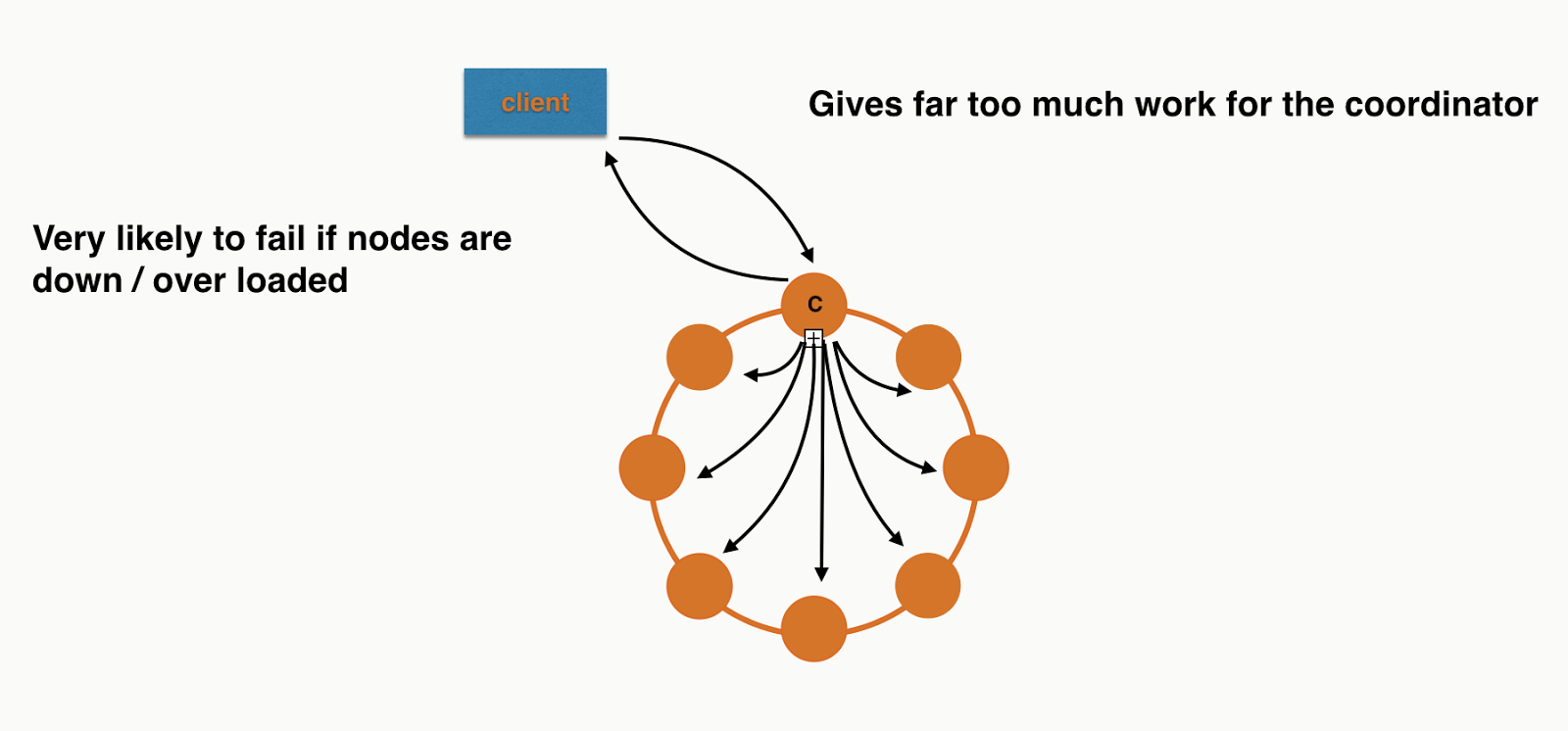
Now that sounds like a lot of work. So if you try to use logged batches as a performance improvement then you'll be very disappointed! For a logged batch with 8 insert statements (equally distributed) in a 8 node cluster it will look something like this:


The coordinator has to do a lot more work than any other node in the cluster. Where if we were to just do them as regular inserts we'd be looking like this:


A nice even workload.

So when would you want to use logged batches?


Short answer: consistent denormalisation. In most cases you won't want to use them, they are a performance hit. However for some tables where you have denormalised you can decide to make sure that both statements succeed. Lets go back to our customer event table from the previous post but also add a customer events by staff id table:


We could insert into this table in a logged batch to ensure that we don't end up with events in one table and not the other. The code for this would look like this:


This would mean both inserts would end up in the batch log and be guaranteed to eventually succeed.

The downside is this adds more work and complexity to our write operations. Logged batches have two opportunities to fail:
  1. When writing to the batch log
  2. When applying the actual statements
Let's forget about reads as they aren't destructive and concentrate on writes. If the first phase fails Cassandra returns a WriteTimeoutException with write type of BATCH_LOG. This you'll need to retry if you want your inserts to take place. 

If the second phase fails you'll get a WriteTimeoutException with the write type of BATCH. This means it made it to the batch log so that they will get replayed eventually. If you definitely need to read the writes you would read at SERIAL, meaning any committed batches would be replayed first.

Conclusion


Logged batches are rarely to be used, they add complexity if you try to read at SERIAL after failure and they are a performance hit. If you are going to use them it is in the odd situation where you can't handle inconsistencies between tables. They allow you to guarantee the updates will eventually happen, they do not however offer isolation i.e a client can see part of the batch before it is finished. 

Monday, February 23, 2015

Spring Security + Basic Auth + MD5Password encoding with salt all stored in Cassandra

I've just put together a simple Spring boot application that has REST endpoints secured by basic auth  with the users stored in Cassandra. I want the application to be completely stateless and will assume access is over HTTPS.

I found it surprisingly difficult to plug all this together with Java config, there are very few complete examples so I ended up spending more time looking at the Spring source than I expected. Ah well that just confirms my love of using open source libraries and frameworks.

Essentially you need an extension of the WebSecurityConfigurerAdapter class where you can programatically add your own UserDetailsService.

Here's my example, I'll explain it below.


Line 11: I've injected the MD5PasswordEncoder as I also use in the code that handles the creation of users in the database.

Line 14-22: Here is where we configure our custom UserDetailsService which I'll show later. We don't want to store user's passwords directly so we use the built in MD5PasswordEncoder. Just using a one way hash isn't good enough as people can break this with reverse lookup tables so we also want to sprinkle in some salt. Our implementation of the UserDetailsService will have a field called Salt and we use the ReflectiveSaltSource to pick it up. Given how common salting passwords is I was surprised there wasn't a separate interface where this was explicit, but ah well.

Line 25-34: Here we define what type of security we want, we tell Spring security to be stateless so it doesn't try and store anything in the container's session store. Then we enable BasicAuth and define the URLs we want to be authorised. The API for creating users is not authorised for obvious reasons.

Next we want to build an implementation of the UserDetailsService interface that checks Cassandra.

I won't go through the Cassandra code in the blog but just assume we have a DAO with the following interface:


If you're interested in the Cassandra code then checkout the while project from GitHub.

With that interface our UserDetailsService looks like this:


Here we use the awesome Optional + Lambda to throw if the user doesn't exist. Our DAO interface doesn't use Runtime exceptions as I like type systems, but this is a nice pattern to convert between a Optional and a library expecting exceptions.

The UserWithSalt is an extension of the Spring's User, with one extra field that the ReflectiveSaltSource will pick up for salting passwords.


That's pretty much it, when a request comes in Spring security will check if the path is authorised, if it is it will get the user details from our UserDetailsService and check the password my using the ReflectiveSaltSource and MD5PasswordEncoder. So our database only has the MD5 password and the salt used to generate it. The salt is self is generated using the Java SecureRandom when users are created.

Full source code is at GitHub and I've created the branch blog-spring-security in case you're reading this in the future and it has all changed!


Wednesday, February 18, 2015

A simple MySql to Cassandra migration with Spark

I previously blogged about a Cassandra anti-pattern: Distributed joins. This commonly happens when people move from a relational database to a Cassandra. I'm going to use the same example to show how to use Spark to migrate data that previously required joins into a denormalised model in Cassandra.

So let's start with a simple set of tables in MySQL that store customer event information that references staff members and a store from a different table.


Insert a few rows (or a few million)


Okay so we only have a few rows but imagine we had many millions of customer events and in the order of hundreds of staff members and stores.

Now let's see how we can migrate it to Cassandra with a few lines of Spark code :)

Spark has built in support for databases that have a JDBC driver via the JdbcRDD. Cassandra has great support for Spark via DataStax's open source connector. We'll be using the two together to migrate data from MySQL to Cassandra. Prepare to be shocked how easy this is...

Assuming you have Spark and the connector on your classpath you'll need these imports:


Then we can create our SparkContext and it also adds the Cassandra methods to the context and to RDDs.

My MySQL server is running on IP 192.168.10.11 and I am connecting very securely with with user root and password password.

Next we'll create the new Cassandra table, if yours already exists skip this part.


Then it is time for the migration!


We first create an JdbcRDD allowing MySQL to do the join. You need to give Spark a way to partition the MySql table, so you give it a statement with variables in and a starting index and a final index. You also tell Spark how many partitions to split it into, you want this to be greater than the number of cores in your Spark cluster so these can happen concurrently.

Finally we save it to Cassandra. The chances are this migration will be bottle necked by the queries to MySQL. If the Store and Staff table are relatively small it would be worth bringing them completely in to memory, either as an RDD or as an actual map so that MySQL doesn't have to join for every partition.

Assuming your Spark workers are running on the same servers as your Cassandra nodes the partitions will be spread out and inserted locally to every node in your cluster.

This will obviously hammer the MySQL server so beware :)

The full source file is on Github.

Monday, February 9, 2015

Cassandra anti-pattern: Misuse of unlogged batches

This is my second post in a series about Cassandra anti-patterns, here's the first on distributed joins. This post will be on unlogged batches and the next one on logged batches.

Batches are often misunderstood in Cassandra.  They will rarely increase performance, that is not their purpose. That can come as quite the shock to someone coming from a relational database.

Let's understand why this is the case with some examples. In my last post on Cassandra anti-patterns I gave all the examples inside CQLSH, however let's write some Java code this time.

We're going to store and retrieve some customer events. Here is the schema: 


Here's a simple bit of Java to persist a simple value object representing a customer event, it also creates the schema and logs the query trace.


We're using a prepared statement to store one customer event at a time. Now let's offer a new interface to batch insert as we could be taking these of a message queue in bulk.


It might appear naive to just implement this with a loop:


However, apart from the fact we'd be doing this synchronously, this is actually a great idea! Once we made this async then this would spread our inserts across the whole cluster. If you have a large cluster, this will be what you want.

However, a lot of people are used to databases where explicit batching is a performance improvement. If you did this in Cassandra you're very likely to see the performance reduce. You'd end up with some code like this (the code to build a single bound statement has been extracted out to a helper method):


Looks good right? Surely this means we get to send all our inserts in one go and the database can handle them in one storage action? Well, put simply, no. Cassandra is a distributed database, no single node can handle this type of insert even if you had a single replica per partition.

What this is actually doing is putting a huge amount of pressure on a single coordinator. This is because the coordinator needs to forward each individual insert to the correct replicas. You're losing all the benefit of token aware load balancing policy as you're inserting different partitions in a single round trip to the database.

If you were inserting 8 records in a 8 node cluster, assuming even distribution, it would look a bit like this:


Each node will have roughly the same work to do at the storage layer but the Coordinator is overwhelmed. I didn't include all the responses or the replication in the picture as I was getting sick of drawing arrows! If you need more convincing you can also see this in the trace. The code is checked into Github so you can run it your self. It only requires a locally running Cassandra cluster.

Back to individual inserts


If we were to keep them as normal insert statements and execute them asynchronously we'd get something more like this:


Perfect! Each node has roughly the same work to do. Not so naive after all :)


So when should you use unlogged batches?


How about if we wanted to implement the following method:


Looks similar - what's the difference? Well customer id is the partition key, so this will be no more coordination work than a single insert and it can be done with a single operation at the storage layer. What does this look like with orange circles and black arrows?


Simple! Again I've left out replication to make it comparable to the previous diagrams.

Conclusion


Most of the time you don't want to use unlogged batches with Cassandra. The time you should consider it is when you have multiple inserts/updates for the same partition key. This allows the driver to send the request in a single message and the server to handle it with a single storage action. If batches contain updates/inserts for multiple partitions you eventually just overload coordinators and have a higher likelihood of failure.

The code examples are on github here.

Tuesday, February 3, 2015

Testing Cassandra applications: Stubbed Cassandra 0.6.0 released

Stubbed Cassandra (Scassandra) is an open source test double for Cassandra. Martin Fowler has a very general definition of what a test double actually is.

When I refer to a test double I mean stubbing out at the protocol level. So if your application makes calls over HTTP, your test double acts as an HTTP server where you can control the responses, and most importantly: inject faults. Wiremock is a great example of a test double for HTTP.

I like this kind of stubbing out as it allows me to really test drivers / network issues etc. Deploying to cloud environments where network/servers going down happens more frequently makes this even more important. If you're using a JVM language and all this happens in the same JVM it is also quick.

Why is this release important?


This is an important release for Scassandra as it now supports all types, previously it only supported the subset of CQL that my old employer, BSkyB, used. Now's a good time to mention that this tool was developed completely in my own time and not while working there :)

It still has lots of limitations (no user defined types, no batch statements, no LWT) but as it is designed to test individual classes it is still usable for all your code that doesn't use these features even if they are used some where in your application.

I had previously used it for full integration tests, in that case it had to support your entire schema. I have stopped doing that as I intend to build a different type of Cassandra testing tool for that using CASSANDRA-6659. This JIRA extracted an interface for handling queries, which I want to use to inject faults/delays etc. If you haven't used Scassandra before it is important to know it doesn't embed a real Cassandra, it just implements there server side of the native protocol and "pretends" to be Cassandra.

Version 0.6.0 has a view of Cassandra 3.0, where embedded collections are likely to be supported. Previously you used an enum to inform Scassnadra what your column types are, or the variables in prepared statements.  For example:


Here the withColumnTypes method on the builder informs Scassandra how to serialise the rows passed into withRows.

This worked for primitive types e.g Varchar, Text. But what about collections? Sets were supported first so I went with VarcharSet etc, bad idea! What about Maps? That is a lot of combinations, and even worse List<Map<String, Int>>?

An enum was a bad idea, so in 0.6.0 I've introduced the CqlType, this has sub classes for Primitive/Collections and there is a set of static methods and constants to make it nearly as convenient as an enum for the simple types. The advantage of this is I can now embed types inside each other e.g


And then when Cassandra 3.0 comes we can have things like map(TEXT, map(TEXT, TEXT)) for a multi map.

The end goal is actually for you to give your schema to Scassandra and it will just work this out. This is some way off as it requires being able to parse CQL and at the moment Scassandra just pattern matches against your queries.

Happy testing and as always any feature requests/feedback just ping me on twitter @chbatey

Monday, February 2, 2015

Cassandra anti-pattern: Distributed joins / multi-partition queries

There’s a reason when you shard a relational databases you are then prevented from doing joins. Not only will they be slow and fraught with consistency issues but they are also terrible for availability. For that reason Cassandra doesn’t even let you join as every join would be a distributed join in Cassandra (you have more that one node right?).

This often leads developers to do the join client side in code. Most of the time this is a bad idea, but let’s understand just how bad it can be.

Let’s take an example where we want to store what our customers are up to, here’s what we want to store:
  • Customer event
    •  customer_id  e.g ChrisBatey
    •  staff_id e.g Charlie
    •  event_type e.g login, logout, add_to_basket, remove_from_basket
    •  time
  • Store
    • name
    • store_type e.g Website, PhoneApp, Phone, Retail
    • location
We want to be able to do retrieve the last N events, time slices and later we’ll do analytics on the whole table. Let’s get modelling! We start off with this:


This leads us to query the customer events table, then if we want to retrieve the store or staff information we need to do another query. This can be visualised as following (query issued at QUORUM with a RF of 3):


For the second query we’ve used a different coordinator and have gone to different nodes to retrieve the data as it is in a different partition.

This is what you’d call a one to one relationship for a single query but in reality it is a many to one as no doubt many customer events reference the same store. By doing a client side join we are relying on a lot of nodes being up for both our queries to succeed.

We’d be doing a similar thing for staff information. But Let’s make things worse by changing the staff relationship so that we can associate multiple staff members with a single customer event.

The subtle difference here is that the staff column is now a set. This will lead to query patterns like:

This looks good right? We’re querying by partition id in the staff table. However it isn’t as innocent as it looks. What we’re asking the coordinator do do now is query for multiple partitions, meaning it will only succeed if there are enough replica up for them all. Let’s use trace to see how this would work in a 6 node cluster:

Here I've span up a 6 node cluster on my machine (I have a lot of RAM) with the IPs 127.0.0.(1-6).
We'll now insert a few rows in the staff table:

Now lets run a query with consistency level ONE with tracing on:

The coordinator has had to go to replicas for all the partitions. For this query 127.0.0.1 acted as coordinator and the data was retrieved from 127.0.0.3, 127.0.0.5, 127.0.0.6. So 4 out of 6 nodes needed to be behaving for our query to succeed. If we add more partitions you can see how quickly we’d end up in a situation where all nodes in the cluster need to be up!

Let’s make things even worse by upping the consistency to QUORUM:

Here 127.0.0.1 was the coordinator again, and this time 127.0.0.2, 127.0.0.3, 127.0.0.4, 127.0.0.5 were all required, we’re now at 5/6 nodes required to satisfy what looks like a single query.
This makes the query vastly more likely to ReadTimeout.

It also gives the coordinator much more work to do as it is waiting for responses from many nodes for a longer time.

So how do we fix it? We denormalise of course!

Essentially we've replaced tables with user defined types.

Now when we query for a customer event we already have all the information. We’re giving coordinators less work to do and each query we do only requires the consistency’s worth of nodes to be available.

Can I ever break this rule? 


In my experience there are two times you could consider breaking the no-join rule.
  1. The data you’re denormalising is so large that it costs too much 
  2. The table like store or staff is so small it is okay to keep it in memory 
So lets take the first one. Let’s say each event has a larger blob/JSON/XML associated with it that you needed to keep verbatim for later reporting and you need to query it in multiple ways so you end up with a table per query. If the raw data is many TBs then denormalising may require a much larger cluster. At this point you could consider trading off availability/speed for the cost of the larger cluster. This doesn’t mean once you have the IDs from the lookup table you should have large IN queries, alternatively you can still issue the queries to the verbatim data table independently using the native driver’s async functionality.

The other time you may want to avoid denormalisation is when a table like staff or store is so small it is feasible to keep a copy of it in memory in all your application nodes. You then have the problem about how often to refresh it from Cassandra etc, but this isn't any worse than denormalised data where you typically won’t go back and update information like the store location.

Conclusion 


To get the most out of Cassandra you need to retrieve all of the data you want for a particular query from a single partition. Anytime you don’t you are essentially doing a distributed join, this could be explicitly in your application of asking Cassandra to go to multiple partitions with an IN query. These types of queries should be avoided as often as possible. Like with all good rules there are exceptions but most users of Cassandra should never have to use them.

Any questions feel free to ping me on twitter @chbatey